How to Resize Images on Your Android Phone Using the Native Gallery App
🔗 Share this on: Facebook Twitter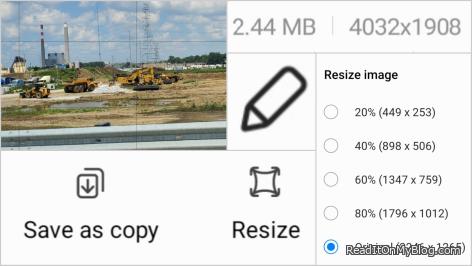
If you've ever tried uploading a photo from your phone to your blog or website only to find the file is too big, you're not alone. Turns out, the Android Gallery app -- the one that came with my phone -- can do it in seconds. No downloads. No extra steps.
For the longest time, I thought I needed a computer or a third-party app to shrink my images.
As a blogger, I often capture something on the road and want to post it immediately. In the past, large file sizes forced me to wait until I got home to resize them on my desktop.
That's no longer the case.
Here's how to resize an image directly from your Android phone:
1. Open the Gallery app and select the photo you want to resize.
2. Tap the edit icon (the little pencil at the bottom).
3. Tap the three dots in the bottom-right corner.
4. Select Resize.
5. Choose a reduction (80%, 60%, 40%, 20%) -- the app will even show you the resulting pixel dimensions.
6. Save as a copy so you keep the original.
That's it.
Now you've got a smaller, web-friendly image ready to upload straight from your phone.
If you're curious about why resizing matters -- and what things like PPI and DPI have to do with it -- check out my follow-up article: "Why Image Size and Resolution Matter for the Web vs. Print."
Discover more stories, discussions, and background information related to How to Resize Images on Your Android Phone Using the Native Gallery App.
Below are selected articles and topics from our site where this appears or is explored in greater detail.
Image Size Basics for New Bloggers: Why Your Photos Might Be Slowing Down Your Website
If you're new to blogging and wondering why your pages take forever to load, your images might be the culprit. Many beginners upload photos straight from their phone or camera without realizing they're several megabytes in size -- far bigger than needed for the web. The right resolution can make a huge difference in how fast your site loads and how your visitors experience it. Read more »
Related Topics:
Recent Posts
 What Does 'Finagle' Really Mean? The English Word I Never Used in 40 Years
  When You're Too Sleepy to Think, but Too Passionate to Stop
  Liam Neeson and Pamela Anderson: An Unexpected Hollywood Match?
  AI Is Eating Entry-Level Computer Science Jobs - And I've Seen It Happen...
  Why Do Laptop Touchpads Secretly Hate Left-Handed People?
  My only proof that I visited Columbus Ohio - A funky picture of the...
  Prostate cancer - What you need to know
  Why Every Creator Needs Their Own Corner of the Internet -- And How Easy...
  A 50s man guide to visiting the Doctor


 The Day Corporate America Scared the Daylights Out of Me
  Do You Remove People From Your Social Media When They Die?
  How to Make Up After an Argument in a Relationship: The Power of Pride, Apology, and Red Roses
  My Android Phone Screen Keep Turning On by Itself - Here's How I Fixed It
  The Walk That Helped Me Find Myself Again (Rediscovering Yourself)
  Fake Friends, True Friendship, How to Recognize Fake Love, and Toxic Relationships
- The Hidden Gas Saver - Tire Pressure Directly Affects More Than You Think
- Why Do Laptop Touchpads Secretly Hate Left-Handed People?
- JW Marriott and Colts Pride Shape the Indianapolis Skyline
- From Bad to Worse: How Grocery Prices Keep Climbing
- There is a huge connection between dehydration and stress in our body - Discover why is so important to say hydrated
- Your mind may dream big, but your hands can build a future AI can never replace
- Thank God for Ramen Noodles - Sometimes having them around can be a lifesaver
- Why Every Creator Needs Their Own Corner of the Internet -- And How Easy It Is to Claim Yours
- Comfort: Why Do Old People Wear Weird Clothes?
- The Mysterious Logic Behind Laptop Touchpad Design