Image Size Basics for New Bloggers: Why Your Photos Might Be Slowing Down Your Website
If you haven't read my step-by-step guide on how to resize an image using your Android phone's native Gallery app, check it out first -- it's the easiest way to shrink those oversized files before uploading.
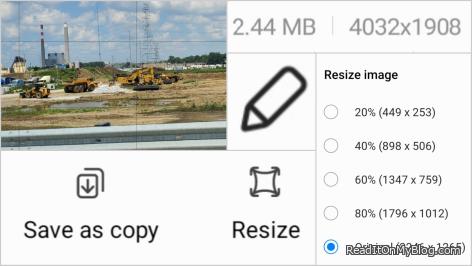
How to Resize Images on Your Android Phone Using the Native Gallery App
Sorry iPhone users, I'm an Android guy.
Now that you know how to resize an image on your phone, let's talk about why it's important -- and why the right resolution can make or break your website's performance.
Why Image Size and Resolution Matter for the Web vs. Print
When you take a picture, your phone saves it at a certain resolution -- measured in pixels per inch (PPI).
For printing, you typically want a high resolution (300 DPI or more) so the image looks sharp on paper. But for the web, you only need 72 DPI. That's enough for crisp, clear viewing on screens without wasting file space.
Why it matters:
Faster page loads - Large files (like 2MB images) slow down your site and frustrate visitors.
Better user experience - People won't wait for slow pages to load.
SEO benefits - Search engines factor site speed into rankings.
If your goal is to share online, resize your images and lower the DPI before uploading.
The result is a clean, fast-loading site -- and happier readers.
Opinions:
Related Topics:
Other Articles:
Did I tell you about my first Shelbyville Indiana experience?
Drum Corps International (DCI): A Summer of Dedication, Discipline, and Dreams, a teacher explains
Return to Articles ListRecent Posts
 A Journey of Self-discovery: The Story Of The Old Man and the Audi A6
  Fourteen Hours to Kill at the Airport, two Dead Batteries, and a lesson...
  The Day Corporate America Scared the Daylights Out of Me
  I Almost Won the Lottery and I Am Still Smiling About It
  Do You Remove People From Your Social Media When They Die?
 Photo Stories
 Big Screen TV Have Come A Long Way - This one is 100 inches, wow!
  The Dunkin donut coffee I bought because I had to pee
  Let’s Talk About Relationships, The Good the Bad and The Ugly
  Why Every Creator Needs Their Own Corner of the Internet -- And How Easy...
  Why Did My Android Phone Icons Turn Purple?


 Did You Know? No More Pennies Starting in 2026
  The Red Pill and the Blue Pill: What The Matrix Was Really Asking Us
  Liam Neeson and Pamela Anderson: An Unexpected Hollywood Match?
  These Freakin' Notifications Just Get on My Nerves Sometimes
  AI Is Eating Entry-Level Computer Science Jobs - And I've Seen It Happen Firsthand
  Education Gives You Access. Intelligence Gives You Direction.
  Fake Friends, True Friendship, How to Recognize Fake Love, and Toxic Relationships
- When You're Too Sleepy to Think, but Too Passionate to Stop
- The Hidden Gas Saver - Tire Pressure Directly Affects More Than You Think
- A real friend is one who walks in when the rest of the world walks out
- I Grew Up Watching The Jetsons -- Now I'm Living Their Future
- Image Size Basics for New Bloggers: Why Your Photos Might Be Slowing Down Your Website
- What Does 'Finagle' Really Mean? The English Word I Never Used in 40 Years
- Did You Know You Can Make Photo Collages with Your Android's Built-In Gallery App?
- How to Make Up After an Argument in a Relationship: The Power of Pride, Apology, and Red Roses
- My Android Phone Screen Keep Turning On by Itself - Here's How I Fixed It
- I Almost Won the Lottery and I Am Still Smiling About It