Why Did My Android Phone Icons Turn Purple?
🔗 Share this on: Facebook Twitter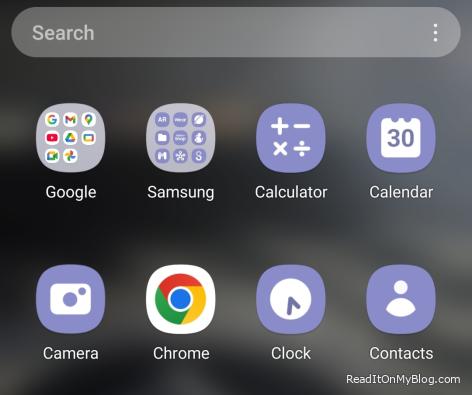
The other day, I unlocked my phone and suddenly noticed that most of my app icons had turned purple--Calculator, Calendar, Camera, even the Clock--all covered in the same theme. For a moment, I almost had a mini heart attack.
My first thought?
Something is wrong with the phone.
Maybe the system is glitching, maybe I installed something bad, maybe the screen is broken. I honestly started to panic.
But after a little digging, I realized nothing was wrong at all.
It turns out this is a feature, not a bug.
What Actually Happened?
On newer Android phones, there's a feature called Material You (or "Color Palette" in Samsung phones). It automatically changes the colors of your icons and menus to match your wallpaper.
So if your wallpaper has purple in it--or if the system randomly picks purple--suddenly half your icons turn that color. That's exactly what happened to me. I don't even remember touching my wallpaper or theme settings, but somehow the palette got switched to purple.
Let me tell you, man... these "fancy new features" might be fun for some people, but for someone like me--who's not a big fan of surprises at my age--they really give me the creeps.
How to Fix It (If You Don't Like Purple)
Go to Settings > Wallpaper & style.
Choose a different Color palette, or turn off Themed icons.
Your apps will go back to their normal look instantly.
Lesson Learned
At first, I thought my phone was broken.
In reality, it was just a design choice made by Android.
If this ever happens to you--don't panic. Your phone isn't damaged. It's just a setting you can easily change.
I guess for the younger generation, who seem to enjoy change all the time, this is an amazing feature. But for me? I just wish these companies would leave these freaking things alone.
🔗 Share this on: Facebook TwitterRelated Topics:
Recent Posts
 Fourteen Hours to Kill at the Airport, two Dead Batteries, and a lesson...
  Why Do Laptop Touchpads Secretly Hate Left-Handed People?
  The Walk That Helped Me Find Myself Again (Rediscovering Yourself)
  My Android Phone Screen Keep Turning On by Itself - Here's How I Fixed It
  A 50s man guide to visiting the Doctor
  A real friend is one who walks in when the rest of the world walks out
  Prostate cancer - What you need to know
  Is an SSD really better than a regular hard drive?
  Do You Realize How Many Calories Are in Wendy's Saltine Crackers?


 Relationships: Why do some breakups hurt so much harder than others?
  Liam Neeson and Pamela Anderson: An Unexpected Hollywood Match?
  They Told Me My Private Life Was Interfering with My Job
  When You're Too Sleepy to Think, but Too Passionate to Stop
  What Does 'Finagle' Really Mean? The English Word I Never Used in 40 Years
  Born in the Real World, Living in the Matrix - Immigrant Life In America Explained
- When You're Too Sleepy to Think, but Too Passionate to Stop
- Fourteen Hours to Kill at the Airport, two Dead Batteries, and a lesson learned
- The Day I Met Pyrotool: The Real One Behind the Screen
- The Walk That Helped Me Find Myself Again (Rediscovering Yourself)
- Do You Remove People From Your Social Media When They Die?
- They Told Me My Private Life Was Interfering with My Job
- Liam Neeson and Pamela Anderson: An Unexpected Hollywood Match?
- A Journey of Self-discovery: The Story Of The Old Man and the Audi A6
- What Does 'Finagle' Really Mean? The English Word I Never Used in 40 Years
- The Day Corporate America Scared the Daylights Out of Me